Use Cases

Built for every kind of STB deployment

AdminSTB adapts to the operational reality of ISPs, streaming providers, hotel chains, and digital signage operators. Here's how each of them uses the platform.

Internet Service Providers

Protect your network from the devices your subscribers own

Generic Android STBs are one of the biggest unmanaged attack surfaces on residential and business networks. They ship with malware. They generate traffic. You pay for the bandwidth.

AdminSTB gives ISPs the tools to identify which subscriber devices are running known malicious processes, terminate them remotely, and monitor the situation fleet-wide β€” without a truck roll, a support call, or a subscriber interaction.

  • πŸ›‘οΈ
    Malware process killer Define a kill list of known malicious package names. The agent enforces it on every check-in across every subscriber device.
  • πŸ“Š
    Per-device bandwidth context Real-time network status, foreground app, ping latency, and IP address help correlate network anomalies to specific devices.
  • πŸ”Œ
    No truck rolls required Reboot, diagnose, push fixes, or suspend a device entirely from the dashboard. None of it requires visiting the subscriber's premises.
  • πŸ’³
    Non-payment enforcement Suspend a device with a full-screen overlay message the moment an account goes past due. Re-enable instantly when payment is confirmed.
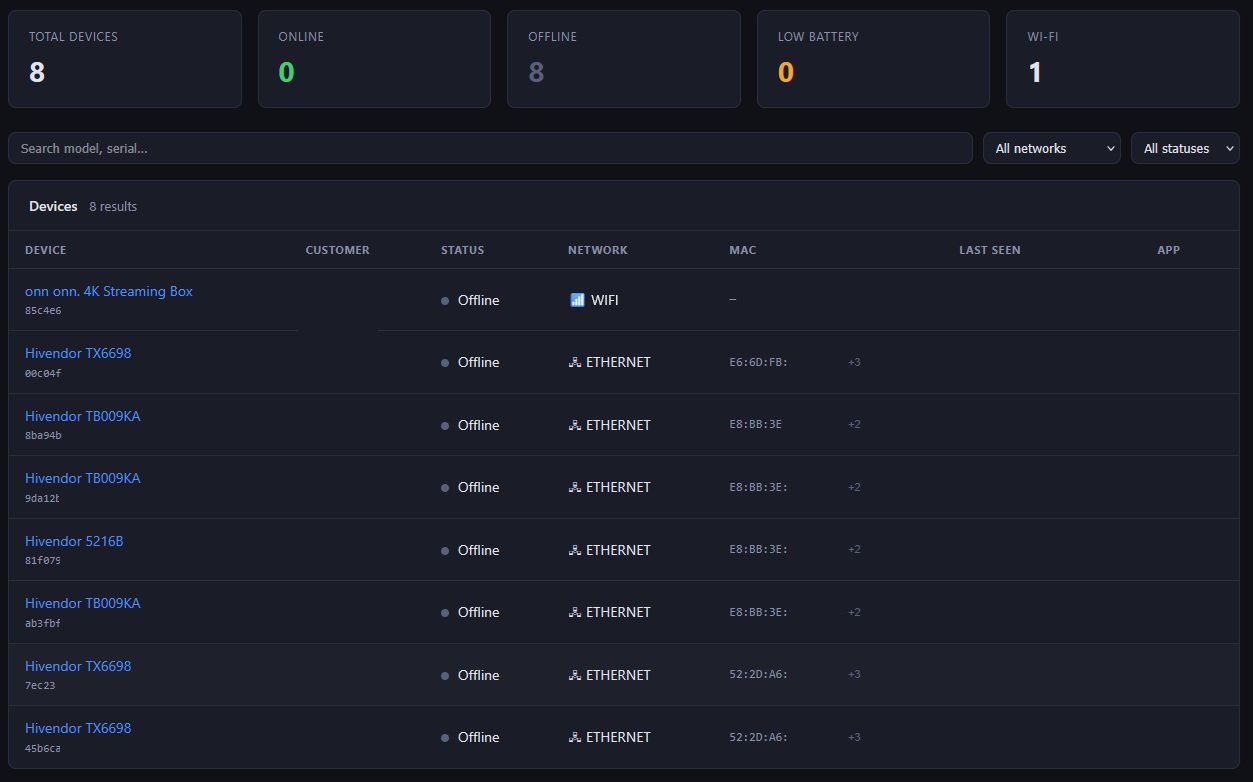
AdminSTB fleet overview dashboard
0
Truck rolls needed to kill a malware process fleet-wide
<15min
From suspension command to device lockout
IPTV & Streaming Providers

Keep every subscriber device healthy and up to date

Your subscribers experience your service through their STB. If the box is running the wrong app version, overheating, or losing signal, they're calling you β€” not fixing it themselves.

AdminSTB gives your support team live visibility into every device's state, and the tools to fix most issues without escalating or dispatching anyone.

  • πŸ“±
    Silent app updates Push your IPTV client to every device in the fleet without a single subscriber action. The update happens silently in the background.
  • πŸ“Ά
    Streaming quality diagnostics Wi-Fi RSSI, frequency band, and ping latency tell you immediately whether a buffering complaint is a signal issue or something else.
  • πŸ–ΌοΈ
    Remote screenshots See exactly what the subscriber sees on their TV without asking them to describe it. Diagnose error dialogs, frozen screens, and wrong content instantly.
  • ⏸️
    Instant service suspension Non-paying subscriber? One click suspends the device and displays your custom message on their TV screen, even while content is playing.
πŸ“Έ
Device detail β€” telemetry + controls
3
Screenshot capture methods β€” works with or without root
Hotels & Hospitality

Manage every room's TV without entering the room

A dead remote battery, a frozen screen, or the wrong channel β€” in a hotel, these are not minor inconveniences. They're front desk calls, maintenance dispatches, and guest experience failures.

AdminSTB gives hospitality operations a dashboard view of every TV in every room, with the tools to resolve most issues remotely before the guest even considers calling.

  • πŸ”‹
    Bluetooth remote battery monitoring See the battery level of every room's Bluetooth remote control from the dashboard. Dispatch maintenance proactively β€” before the guest notices.
  • πŸ“Έ
    Remote screen verification Take a screenshot of any room's TV without entering the room. Verify the content is correct, identify display errors, or confirm a restart worked.
  • πŸ”„
    Instant remote reboot Frozen screen? Reboot the device from the front desk. No maintenance call, no room visit, no guest disruption.
  • πŸ“‘
    Wi-Fi placement verification Confirm every room's STB is connected to the correct hotel Wi-Fi network and check real-time signal quality. Identify rooms with coverage gaps before guests complain about streaming quality.
πŸ“Έ
Remote screenshot β€” room TV
0
Room visits needed to reboot a frozen TV
Digital Signage

Always-on displays demand always-on management

A signage screen that crashes or shows the wrong content isn't just an embarrassment β€” it's a broken commitment to whoever is paying for the advertising or information display.

AdminSTB gives digital signage operators continuous health monitoring and remote control over every display device, with the tools to resolve incidents remotely and push content updates silently.

  • πŸ–₯️
    Visual verification via screenshot Confirm any display is showing the correct content without visiting the location. Catch crashes, black screens, or wrong playlists immediately.
  • πŸ”„
    Auto-restart after updates AdminSTB automatically re-launches your signage app after a silent self-update, ensuring the display never shows a blank Android home screen mid-operation.
  • 🌑️
    Thermal monitoring Display devices in enclosed enclosures can overheat. Thermal state alerts let you respond before the device throttles, crashes, or fails permanently.
  • ⚑
    Shell command execution Clear app caches, restart display services, or trigger any maintenance task via remote shell command β€” without visiting the installation site.
πŸ“Έ
Signage device β€” thermal + uptime
12+
Health metrics monitored per device per cycle
Get Started

Find out how AdminSTB fits your operation

Talk to us about your fleet size, device types, and what problems you're trying to solve. We'll show you exactly how AdminSTB addresses them.